One-click Minifier Gadget (OMG) – initial checkin
So I've been thinking and talking to folks about this idea of having one-stop shop for all your minification needs. Minification of JS and CSS as well as image optimization helps site performance by reducing download sizes. This is good. But not a lot of people do it.
People don't do it, because it's a PITA
It's simple enough, but with deadlines upon you and all that, you don't want to do an extra step. That's why having a build process helps, by automating this. But setting up a build process is yet another PITA. So it goes.
So my idea was to help busy designers and developers, that wouldn't invest their time researching which minifiers are good, downloading setting up, learning about the 10+ PNG optimization tools... That's how the the idea for the one-click OMG tool came about. (One-drag is more appropriate, come to think of it...) One tool that runs on all operating systems - Win, Mac, Linux - and delivers all minification and optimization tools you need as one package.
Running
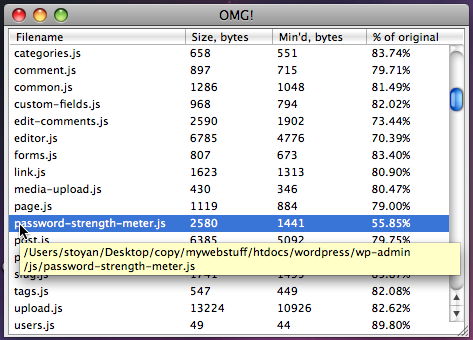
Running the tool is as simple as drag/dropping a bunch of files and directories. Here I've dropped "wordpress" directory. The tool recursively looks into the dropped files for things it can optimize. More information here.
Download
Version 0.0.1 is here. It doesn't do image optimization, only JS and CSS minification, but please feel free to download and give it a shot. Unzip the package for your OS and run omg.exe (Windows), OMG.app (Mac), or the omg binary (Linux)
Open source
The code is on GitHub. Fork and enjoy.
The developer's notes are there too - how to setup, run, package. Also a list of todos if you want to help.
Next?
This is just a preliminary version. Feel free to join, comment, suggest. Hate the name? Say so
Personally, looks like my plate is very full for the next moth or two, so I probably won't be actively working on the tool. I hope though the foundation is good enough and relatively documented, should be easy to pick up if anyone's interested in contributing.
Built with XUL
This has been a learning experience for me with XULRunner. I loved it. I love the idea of being able to create cross-OS desktop apps with JavaScript alone.
Behind the scenes, I'm using my JavaScript port of YUICompressor's CSSmin and Doug Crockford's JSMin. JSMin should be replaced with YUICompressor (or Google closure compiler) in the next release.
This entry was posted on Sunday, January 31st, 2010 and is filed under CSS, images, JavaScript, performance, tools, yui. You can follow any responses to this entry through the RSS 2.0 feed. You can leave a response, or trackback from your own site.
Get notification for future posts: follow me on Twitter or subscribe to my RSS feed

January 31st, 2010 at 5:33 am
Sweet. I just created an automater script that allows me do a file selection, combines it in to one file. And minifies it using an apple script that calls the terminal that activates the YUI compressor
But i guess this a more solid solution so thanks for sharing
January 31st, 2010 at 7:46 am
Says “Could not find compatible GRE between version 1.8 and 1.9.*.” on windows 7 x64.
January 31st, 2010 at 9:44 am
Really great idea to release such a tool. It’s very very cool and I’ll definitely start using from now on. What’s indeed great it can be extended to use YUI Compressor or Google Closure Compiler which will really go one step further. Really brilliant idea!
January 31st, 2010 at 11:20 am
We had the same idea and built tinyoptimizer
all of the optimization are done through the app but to keep the produuction server clean we sent each file through a service to a big cloud sever. Check it out here
http://tinycdn.com/Utilities/TinyOptimizer
Thanks, and I’m a huge fan
John
January 31st, 2010 at 12:26 pm
I’ve been thinking about building something similar
I’d never have chosen XUL though, I’d have opted for Python + Qt.
By the way, if you want to automate this, you can run File Conveyor on your server. It’s a daemon that supports any kind of file processing (support for image optimization and CSS/JS minification is built in, and you have the choice between YUI Compressor and Google Close Compiler) and can sync files to the CDN. It detects new/changed files automatically.
January 31st, 2010 at 12:42 pm
Ok, can I just say that you are a total badass? First of all OOP JavaScript is the best book I’ve read on either OOP or JavaScript, and honestly probably my favorite programming book ever — really amazing. Then I sign up for your RSS feed and you release a tool like this, probably not entirely freeing my from a build process on larger projects, but certainly on my smaller projects, and saving my time no matter what.
Thanks for everything! Great combination of inspiration + tools to help you start doing something with said inspiration!
Brian
February 1st, 2010 at 2:32 am
Thanks a ton, Stoyan. I found it very useful to see if I may have missed minifying any newly created files. Eagerly awaiting for the image optimization feature.
February 1st, 2010 at 12:52 pm
Cool tool ! Can we see more personalization in the future on the CSS part? For example for my CSS Frameworks I newer use maximum compression I prefer CSS file to be readable. I really need tool like this but with more customization. Any hope for that?
February 2nd, 2010 at 10:53 pm
please integrate image optimizaing soon!!
February 3rd, 2010 at 8:05 pm
Thanks very much everybody or the nice response!
I’ve been extremely sluggish in replying these days, sorry about that. But I do read everything and keep track of the wishlist items.
February 16th, 2010 at 10:19 am
Good idea! ” Minification of JS and CSS as well as image optimization” This’s tool helps me with my work.
March 21st, 2010 at 3:00 am
I tried the tool, and it is a very good idea.
I found one problem. I minified a whole directory of CSS files, and i noticed that some of the files actually increased in size.
It turns out that some of the files were already minified (i used your JS web version), but the OMG added ; before all }. In other words, it converter a{height:0;width:0} to a{height:0;width:0;}
I used version 1.9.1.3475
March 21st, 2010 at 3:00 pm
@Emil, yes, the online version is newer than the one shipped with the downloadable tool.
You can update just this file manually. Look for cssmin.js in the OMG directory and replace it with this one:
http://github.com/yui/yuicompressor/raw/master/ports/js/cssmin.js
March 21st, 2010 at 4:56 pm
@stoyan
It worked. Thanks
April 23rd, 2010 at 4:10 am
Nice one Stoyan! I think these kind of tools are helping people to build faster websites, without having to know all the implications and such.
I believe some other guys are also toying with this idea:
http://code.google.com/p/web-optimizator/
Also check http://www.webogroup.com/home/site-speedup/
What do you think about these?
September 27th, 2011 at 4:59 am
gadgets…
[...]One-click Minifier Gadget (OMG) – initial checkin / Stoyan’s phpied.com[...]…
October 4th, 2011 at 6:23 pm
food processorreviews reviews…
[...]One-click Minifier Gadget (OMG) – initial checkin / Stoyan’s phpied.com[...]…
November 8th, 2011 at 4:01 pm
Increase your site popularity…
[...]One-click Minifier Gadget (OMG) – initial checkin / Stoyan’s phpied.com[...]…




