AJAX MVC (so to speak)
This is sort of a framework thing to create AJAX applications, based on the MVC design pattern. Yep, I have a lot of buzzwords here, I admit, but this shouldn't be taken too seriously. I was doing a bunch of small projects lately and I found myself using something like this little framework, without even thinking about it. Then I thought about it and I found that the scripts and the organization of them may resamble MVC a bit. So how does MVC fit when you mix things like thin and fatter client, HTML, JavaScript, XMLHttpRequest, PHP and CSS?
Usual AJAX app flow
What usually happens in an AJAX application is:
- you have an HTML page, styled with CSS
- you click on something
- JS sends request to the server (to a PHP script)
- JS updates the original HTML page
Mapping to the MVC pattern
OK, so what part of this process can be associated with a View, or a Model or a Controller? The Model is easy, it's the business logic, writing to a database and so on. This is the PHP script. The View? Obviously this is the HTML page and the CSS. But I'd like to think also about the JS that updates the page as part of the View. I mean it makes sense, it's updating the presentation part. Sometimes you even use innerHTML in the JS, but even if you use DOM, it becomes part of the HTML anyway. How about the Controller? Well, we have two controllers here. One that is on the server side, a PHP script that receives requests and "asks" the Model for the response. The other controller is on the client side, this is the JavaScript that decides what happens on a click of a button and sends an appropriate AJAX request to the PHP controller. Therefore I would consider any behavioural JS as part of the Controller, including attaching events as well as sending HTTP requests.
Here's an illustration:
In action (example)
I went ahead and implemented a very simple application to prove the concept. It's just a blank styled HTML page with a button. The HTML page includes two JavaScripts responsible for behaviours (Controller) and page updates (View). The page also includes a few unrelated helper javascripts, in my case I'm using the YUI library. The JS Controller attaches an event to the button. Then when you click the button, the JS Controller sends a request to the PHP controller. The PHP controller (just a simple switch) figures out what was requested and calls the appropriate object of the business model. In my simplistic case, the abovementioned "model object" is just a simple function, but this can be easily built upon. The Model returns (JSON-encoded) response, in this case it's a list of installed PHP extensions. Now the response is received by the View JS and it updates the page. After that the View calls another function from the JS controller that attaches new events to the new content. (Yep, a little glitch here, maybe it would have been better if the Model's response is handled by the JS controller which in turn calls the JS view updater, but anyway this is easy to fix)
Directory layout
Here's the directory structure:
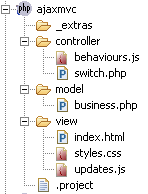
One might argue that it's better if you don't mix .js, .css and .php files in the same directory but the whole idea is open to interpretations anyway, it's just an illustration of the idea.
The code for the example
We get to the fun part, the actual implementation. So we start with a simple .html page, the initial part of the view.
This is index.html
<?xml version="1.1" encoding="iso-8859-1"?> <!DOCTYPE html PUBLIC "-//W3C//DTD XHTML 1.0 Strict//EN" "http://www.w3.org/TR/xhtml1/DTD/xhtml1-strict.dtd"> <html xmlns="http://www.w3.org/1999/xhtml" xml:lang="en"> <head> <title>Welcome</title> <link rel="stylesheet" href="../view/styles.css" type="text/css" media="all" title="Default styles" /> <script language="javascript" type="text/javascript" src="../_extras/yui/build/yahoo/yahoo-min.js"></script> <script language="javascript" type="text/javascript" src="../_extras/yui/build/event/event-min.js"></script> <script language="javascript" type="text/javascript" src="../_extras/yui/build/connection/connection-min.js"></script> <script language="javascript" type="text/javascript" src="../view/updates.js"></script> <script language="javascript" type="text/javascript" src="../controller/behaviours.js"></script> </head> <body> Welcome to my app! <br /> <form action="" method="post"> <input type="button" name="b" id="thebutton" value="I'm a button, click me!" /> </form> <div id="content"> </div> </body> </html>
As you can see, nothing special, simply including the CSS styles, the YUI "extras" and two other javascripts - one part of the View and one that is part of the Controller.
The Controller JS is responsible for attaching an event listener to the button.
This is an excerpt from the behaviours.js
// the behaviour class var behaviours = { phpcontroller: "../controller/switch.php?request=", // more behaviour.methods.... } // initial page load, attach onload event(s) YAHOO.util.Event.addListener( 'thebutton', 'click', behaviours.theButtonClick);
Now when the user clicks the button, the method behaviours.theButtonClick() is executed. It fires a request to the PHP controller switch and says that the request type is "loadSomething":
theButtonClick: function(e) { alert('Ouch! \n\nOK, I\'ll make a request for ya, buddy!'); YAHOO.util.Connect.asyncRequest ( 'GET', behaviours.phpcontroller + 'loadSomething', {success: updates.writeContent} ); },
The PHP controller (controller/switch.php) receives the request, does a simple switch to validate the request type and then calls the appropriate (in my case just a simple) function from the business model. Here's the full switch.php code:
// is this a request? if (empty($_GET['request'])) { die(); } // get the business logic include_once '../model/business.php'; // figure out the request // and call the business logic object switch ($_GET['request']) { case 'loadSomething': echo loadSomething(); break; case 'loadSomeMore': // not used, example echo loadSomeMore(); break; }
The function loadSomething() from the PHP model gets a list of installed PHP extensions, encodes them into JSON and sends them back. This is a full listing of the ../model/business.php
function loadSomething() { $extensions = get_loaded_extensions(); return '["'. implode('","', $extensions) . '"]'; }
If you go back and look at the AJAX request, you'll see that on success, I call the updates.writeContent() method. The ../view/updates.js script contains stuff that updates the HTML of the original page, so its place is in the View part of the app. writeContent simply creates an HTML table with the results (the list of PHP extensions). Then I wanted to attach event listeners to this table just to change color, but it can be more than that. Attaching events is a job for the JS Controller, therefore a method of its class is called. Here's a full listing of updates.js:
var updates = { writeContent: function (xmlhttp) { if (!xmlhttp.responseText) { alert("I got nothing from the server"); } var data = eval(xmlhttp.responseText); var write_to = document.getElementById('content'); write_to.innerHTML = ''; // yeah, I know var html2dom_root = write_to; var table = document.createElement("table"); var table_1_tbody = document.createElement("tbody"); for (var i in data) { table_1_tbody_2_tr = document.createElement("tr"); table_1_tbody_2_tr_1_td = document.createElement("td"); num = 1 + parseInt(i); table_1_tbody_2_tr_1_td_1_text = document.createTextNode(num); table_1_tbody_2_tr_1_td.appendChild(table_1_tbody_2_tr_1_td_1_text); table_1_tbody_2_tr.appendChild(table_1_tbody_2_tr_1_td); table_1_tbody_2_tr_2_td = document.createElement("td"); table_1_tbody_2_tr_2_td_1_text = document.createTextNode(data[i]); table_1_tbody_2_tr_2_td.appendChild(table_1_tbody_2_tr_2_td_1_text); table_1_tbody_2_tr.appendChild(table_1_tbody_2_tr_2_td); table_1_tbody.appendChild(table_1_tbody_2_tr); } table.appendChild(table_1_tbody); html2dom_root.appendChild(table); behaviours.updateTableBehaviour(); } }
(BTW, for the DOM part I'm used the help from my little tool html2dom to make my life a bit easier)
And finally here's the rest of the JS controller (behaviours.js), the method behaviours.updateTableBehaviour() that adds an event listener to the new table and the trClick() that handles clicks on this table. On click, it justs changes the color of the underlying row.
trClick: function (e) { var target = (e.srcElement) ? e.srcElement.parentNode : e.target.parentNode; if (target.tagName == 'TR') { if (target.className == 'tr-on') { target.className = ''; } else { target.className = 'tr-on'; } } }, updateTableBehaviour: function () { var el = document.getElementById('content').firstChild; YAHOO.util.Event.addListener( el, 'click', behaviours.trClick); }
Demo and downloads
- Demo - the live example
- Zipped demo - all the source code for the example
- Template - the source code for the example but with the example part commented, so you can use it as a template for your next AJAX project. The only thing you need to do is to drop the YUI in the _extras/yui folder.
Thank you for reading, any comments welcome!
This entry was posted on Tuesday, September 19th, 2006 and is filed under AJAX, JavaScript, mvc, yui. You can follow any responses to this entry through the RSS 2.0 feed. You can leave a response, or trackback from your own site.
Get notification for future posts: follow me on Twitter or subscribe to my RSS feed

September 20th, 2006 at 6:38 am
[...] http://www.phpied.com/ajax-mvc/ [...]
September 20th, 2006 at 7:20 am
[...] Ever feel like, when you’re coing up that next great Ajax application, that you’re doing the same things over and over again? Like there has to be something better out there to help you make development of common functionality a lighter and easier task? MVC (Model/View/Controller) just might be what you’re looking for, and in this new posting on PHPied.com, they show you the basics of creating your own Ajax MVC framework. This is sort of a framework thing to create AJAX applications, based on the MVC design pattern. Yep, I have a lot of buzzwords here, I admit, but this shouldn’t be taken too seriously. I was doing a bunch of small projects lately and I found myself using something like this little framework, without even thinking about it. Then I thought about it and I found that the scripts and the organization of them may resamble MVC a bit. So how does MVC fit when you mix things like thin and fatter client, HTML, JavaScript, XMLHttpRequest, PHP and CSS? [...]
September 20th, 2006 at 7:26 am
PHPied.com: AJAX MVC (so to speak)…
…
September 20th, 2006 at 9:54 am
Interesting article and there is definitley a need to extend MVC off of the server. However, don’t you think that there is at least some model on the client side? The way I see it is that the view and controllers on the client side interact with a client side model. That client side model then handles the data retrieving and sending. This way you can more easily build caching and buffering into your ajax system. It also means the client side V and C don’t need to know about the server and it can change without effecting them.
September 20th, 2006 at 10:32 am
Thanks for the comment Paul! I’ll need some time to digest that client Model
September 20th, 2006 at 3:23 pm
[...] Ever feel like, when you’re coing up that next great Ajax application, that you’re doing the same things over and over again? Like there has to be something better out there to help you make development of common functionality a lighter and easier task? MVC (Model/View/Controller) just might be what you’re looking for, and in this new posting on PHPied.com, they show you the basics of creating your own Ajax MVC framework. [...]
September 20th, 2006 at 6:18 pm
Hi, just wanted to say thanks for the great logical explanation on how Ajax can be represented in the MVC pattern.
September 21st, 2006 at 10:09 pm
When it comes to HTML/CSS/JavaScript, MVC is known by another name - Presentation, Structure and Behavior. Presentation is the CSS, Structure is (X)HTML and Behavior is JS. Granted, it is different from MVC - but I always equate the two like this…
Model = Structure
View = Presentation
Controller = Behavior
September 28th, 2006 at 5:02 am
I agree with Binny V A that Structure/Presentation/Behaviour is more appropierate for the clientside. How about renaminging it into SPB design pattern for the clientside altogether and make it distintly separate from the backend MVC? That way the job of designing the app could be devided into GUI and Enterprise logic, allowing tweo different peers working together without having to spend time interacting all the time (or be unavoidably done within the same team, whereas it be done faster by peers with different specialties)
Just my 2 cents…
October 2nd, 2006 at 12:25 pm
[...] the solution could involve moving the MVC to different level. Check this interesting article for PHP developers. [...]
October 5th, 2006 at 10:51 am
Stoyan - the only thing I understand on this whole page is the “russian dating” spam right above me. I’ll have to return and print this out and study. It looks wonderfully geeky!
October 5th, 2006 at 11:16 am
Well, it’s not too special, but I like it myself
(Russian dating spam deleted. I got soo much spam comments, I deleted the spam about 20 hours ago and now I had 258 comments held for moderation and probably 50 that made it through the filters. Damn!)
November 22nd, 2006 at 1:26 pm
[...] Buscando, buscando, he encontrado éste artículo de phpied.com. La solución que propone es interesante, pero como él mismo dice es una mera prueba de concepto. [...]
January 25th, 2007 at 2:33 am
While your solution for outputting the resultset may seem simple, here’s a far more elegant and simplistic solution:
var str = "<table>"; for (var i in data) { str += "<tr><td>" + data[i] + "</td></tr>"; } str += "</tr>"; var contentPanel = document.getElementById('content'); contentPanel.innerHTML = str.toString();If your business module were to return an actual result set from the database, you can easily retrieve the row’s column value by doing this: data[i].columnName.
Here’s a practical example:
/* OUTPUT OF TABLE ——————————– id | last name | first name | ——————————– 1 | smith | john 2 | sisko | benjamin 3 | janeway | katherine */ var str = "<table><tr><td>id</td><td>last name</td><td>first name</td></tr>"; for (var i in data) { str += "<tr><td>" + data[i].id + "</td><td>" + data[i].lastName + "</td><td>" + data[i].firstName + "</td></tr>"; } str += "</table>"; var contentPanel = document.getElementById('content'); contentPanel.innerHTML = str.toString();January 31st, 2007 at 8:11 pm
[...] Boris of http://www.ajaxplanet.ru/ has translated my article on the little AJAX/MVC framework I came up with, this is trully flattering, thanks a lot! [...]
March 10th, 2007 at 6:46 pm
[...] Ajaxian vient de relater un article de PHPied sur la mise en application du modèle MVC avec Ajax. [...]
August 2nd, 2007 at 5:22 pm
First of all thanks for the example it clears things up for me about how others are working with MVC. My criticism of this particular methodology would be that all of your ‘module parts’ are abstract. How do you manage them as one piece should you want to reuse the whole module? While I agree with the core part of the concept I am wondering about how difficult it would be to manage.
I think my approach is more of a “MVC Fusebox”. In my scenario you operate on with the AJAX and “business” controller as an AJAX engine. Then when you drop in a module and make a menu reference it is live. I would be interested to hear your thoughts on this approach.
November 16th, 2007 at 9:21 pm
Hi,
Nice concepts you have here! Almost a year after your posting, there’s a paper on using AJAX to implement the business controller:
http://wisdomofganesh.blogspot.com/2007/10/life-above-service-tier.html
And the corresponding discussion at The Server Side:
http://www.theserverside.com/news/thread.tss?thread_id=47213
February 26th, 2008 at 2:30 am
We’re in the process of launching a true JavaScript MVC framework called … what else but JavaScriptMVC ( http://javascriptmvc.com ). It has everything you’d expect in an MVC framework:
Include - can include and compress files cross domain.
Model - Integrated Jester REST library.
Controller - Best in class event delegation library. Function names are combination css selectors and event names.
View - Integrated EJS library (embeddedjs.com)
And, we’ve got things like gears, history, and remote scripting integrated as well.
April 19th, 2008 at 11:29 am
Hi. Congratulations for your article very useful. But I have a question, Working with Object Oriented Programming, it is possible to retrieve objects from the server. Which is the best way to achieve (An example if possible).
July 2nd, 2008 at 8:48 am
Nice concepts .thanks hekimboard
October 1st, 2008 at 9:33 am
The way I see it is that the view and controllers on the client side interact with a client side model. That client side model then handles the data retrieving and sending.
October 1st, 2008 at 3:51 pm
he PHP controller (controller/switch.php) receives the request, does a simple switch to validate the request type and then calls the appropriate (in my case just a simple) function from the business model. Here’s the full switch.php code:
October 15th, 2008 at 4:12 pm
Which is the best way to achieve (An example if possible).
October 26th, 2008 at 10:05 am
merci
October 28th, 2008 at 12:35 pm
Great consept.Thanks a lot.
November 4th, 2008 at 4:43 am
While your solution for outputting the resultset may seem simple
November 18th, 2008 at 1:50 am
Great consept.Thanks a lot.
November 30th, 2008 at 2:20 am
This is not really a framework. Typically, you don’t unzip a framework and program into it. In fact, you never do — that would be called a template; indeed, this is an “application template”. Meanwhile, it’s not really an MVC either, an MVC is an application in which the model is consumable by a view (note: models in that context are typically objects…data structures which have behavior) and in your case, the model is … a function?
Also I should mention, that there are better ways to deal with dynamic dispatch than a big switch statement — in fact, that’s probably the worst way. A dispatch table would be more appropriate, since PHP doesn’t particularly have function references (atleast, last I checked…it’s been some years, probably does now) you could simply use dynamic method-name invocation to simulate a dispatch table ($object->$method()). But in an ideal scenario, and in a framework for that matter, usually your controller is data driven, not a big switch statement you have to add another case to for each new bit of functionality (that doesn’t sound very maintenance friendly).
December 10th, 2008 at 6:48 am
Scott, I think you’re quibbling over implementation details there… the point his post was trying to make it that you can fit AJAX into MVC, and to throw out a brief example for the sake of discussion than provide a definitive framework other people would use to build apps in.
I’m currently working on the same issue and it was nice to get some ideas from Google before I start coding. Thanks for the article.
January 12th, 2009 at 5:48 am
Hi David, it may be worth noting this does not work with IE5.5 or below. Even though the browser is now quite old, people should still be able to view a site. However by setting display:none with a style injection then changing it with jQuery users of IE5.5 or below get nothing, nothing at all. This is obviously due to jQuery’s lack of IE5 support, and it means there’s no graceful degradation.
Something to consider before using this solution I think.
January 12th, 2009 at 5:49 am
Hi okey oyna, it may be worth noting this does not work with IE5.5 or below. Even though the browser is now quite old, people should still be able to view a site. However by setting display:none with a style injection then changing it with jQuery users of IE5.5 or below get nothing, nothing at all. This is obviously due to jQuery’s lack of IE5 support, and it means there’s no graceful degradation.
Something to consider before using this solution I think.
January 12th, 2009 at 5:52 am
I wonder what affect this will have on Googlebot visiting the site - will it interpret the body{display:none} as it being a blank page
February 12th, 2009 at 4:07 am
framework is important for ajax,without it, develop ajax is nightmare.
Long time,don’t know what’s going on.
February 23rd, 2009 at 5:56 pm
dankI wonder what affect this will have on Googlebot visiting the site - will it interpret the body{display:none} as it being a blank page
March 4th, 2009 at 4:29 am
thank you çok güzel bir site olmuş elkinize sağlık
March 4th, 2009 at 4:30 am
thank you süper site olmuş ne demek
April 20th, 2009 at 11:51 pm
Scott, I think you’re quibbling over implementation details there… the point his post was trying to make it that you can fit AJAX into MVC, and to throw out a brief example for the sake of discussion than provide a definitive framework other people would use to build apps in….
May 2nd, 2009 at 5:38 pm
you’re quibbling over implementation details there… the point his post was trying to make it that you can fit AJAX into MVC, and to throw out a brief example for the sake of discussion than provide a definitive framework other people would use to bui
May 18th, 2009 at 9:14 pm
[...] ideas interesantes, les invito a leer el articulo completo desde phpied.com … Link al post http://www.phpied.com/ajax-mvc/ Link al post en Castellano - (via Google translate) [...]
September 26th, 2009 at 2:59 pm
I know this post has been written long ago, but I happened to be researching about architectural patterns and have found that there are diverse approaches (MVA, MVP, and 2 layers MVC). Have to say, that I like how you explain it but mixing js with html, or js with php is not so well separated, as the MVC fundamentals advocate.
I like the Presentation Model pattern (also known as Application pattern) but will scheme the others approaches too.
MVA:
http://blog.palantirtech.com/2009/04/20/model-view-adapter/
Model Adapter View
eg: PHP PHP, JS HTML, CSS
Presentation Model
http://canoo.com/blog/2008/02/01/the-world-needs-more-models/
http://martinfowler.com/eaaDev/PresentationModel.html
Model Controller Presentation Model View
eg: PHP PHP JS HTML, CSS
MVC 2 layers:
Client: Model Controller View && Server Model Controller View
eg: PHP PHP XML, JASON JS JS HTML, XML
I know these patterns say almost the same, but hey just pick one, try it and look which one fits you better. For my purposes I choosed the Model Presenter with an AJAX approach, as it is based on an desktop application and therefore it resembles AJAX objective… bring the application features to a web platform.




