The questions
Is rendering large SVGs significantly slower than smaller ones? Is there a cut-off size above which things are terrible?
And what if these SVGs were PNGs, just for giggles.
To answer this let's generate a bunch of test images and render them!
Test images
A Python script (gen.py) generates 199 SVG files:
- from 1KB to 100KB in 1KB increments
- from 200KB to 10MB in 100KB increments
Each SVG is 1000x1000px and contains random shapes: paths, circles, rectangles… Colors, positions, and stroke widths are randomized.
Then convert-to-png.js turns all SVGs to PNGs using Puppeteer with omitBackground: true for transparency. I also ran them through ImageOptim.
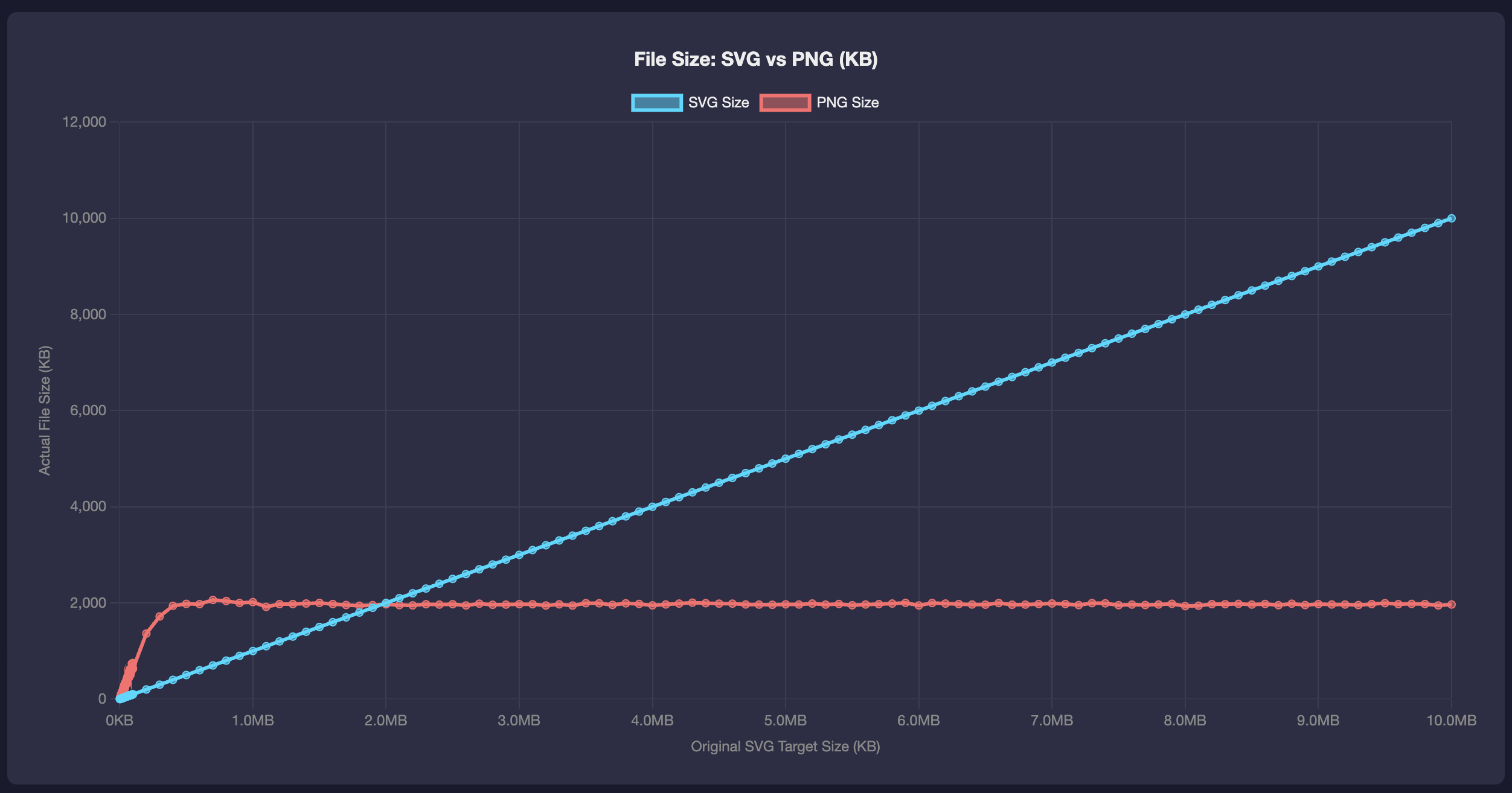
chart-sizes.html shows the file sizes of the original SVGs and after the PNG conversion. The SVG's are all the way to 10 MB but the PNG's don't get that large. Smaller sizes tend to be smaller SVGs. While anything over 2MB seem to be smaller as a PNG.
Next we need a test page to render these, one at a time.
Test page
test.html takes a filename parameter (?file=test_100KB&type=svg).
- Preload the image using
new Image()because we're not interested in how download times are affected, just the rendering. - Display an “inject” button when ready
- On click, append the image to the DOM
- A
PerformanceObservercaptures the INP (interaction to next paint) breakdown:- input delay
- processing duration
- presentation delay
The presentation delay is the time from when the click handler finishes to when the browser actually paints. I actually only really care about INP.
Here is the relevant part from the measurement:
new PerformanceObserver((list) => {
    for (const entry of list.getEntries()) {
        if (entry.name === 'pointerup' || entry.name === 'click') {
            const inputDelay = entry.processingStart - entry.startTime;
            const processingDuration = entry.processingEnd - entry.processingStart;
            const presentationDelay = entry.duration - (entry.processingEnd - entry.startTime);
            const totalINP = entry.duration;
            // ...
        }
    }
}).observe({ type: 'event', buffered: true, durationThreshold: 16 });
Measurement automation
measure.js is a Puppeteer script that:
- Launches Chrome
- For each test file:
- Navigates to
blank.htmlto reset state - Navigates to
test.htmlwith the file parameter - Waits for preload to complete
- Starts a DevTools trace
- Clicks the inject button to add the image to the DOM
- Waits for the
PerformanceObserverto fire - Stops the trace
- Extracts INP from both the observer and the trace
- Navigates to
- Runs each file 3 times and records the median
- Outputs results to JSON
Command line options:
--pngto test PNG files instead of SVG--throttle=Nfor CPU throttling (e.g.--throttle=4for 4x slowdown)--output=file.jsonfor custom output filename
I played with the throttle and without, and the results didn't change in the grand scheme of things. Other than, of course, just the absolute time values being greater in slower CPUs.
Run!
After all the images were generated and converted, I ran:
node measure.js --svg --output=results-svg.json
and
node measure.js --png --output=results-png.json
Results!
You can head out to chart.html to see for yourself.
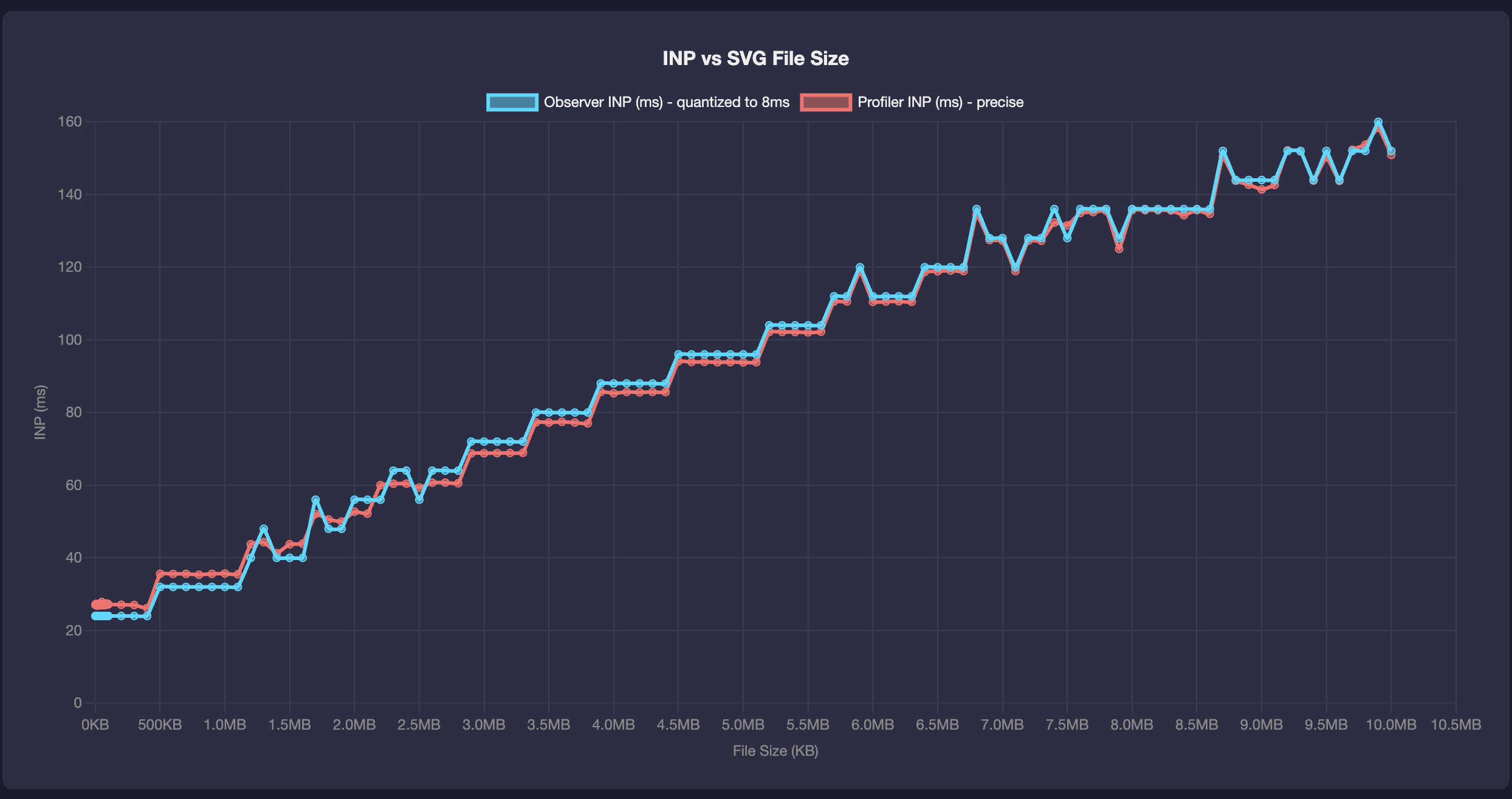
SVG results (all files)
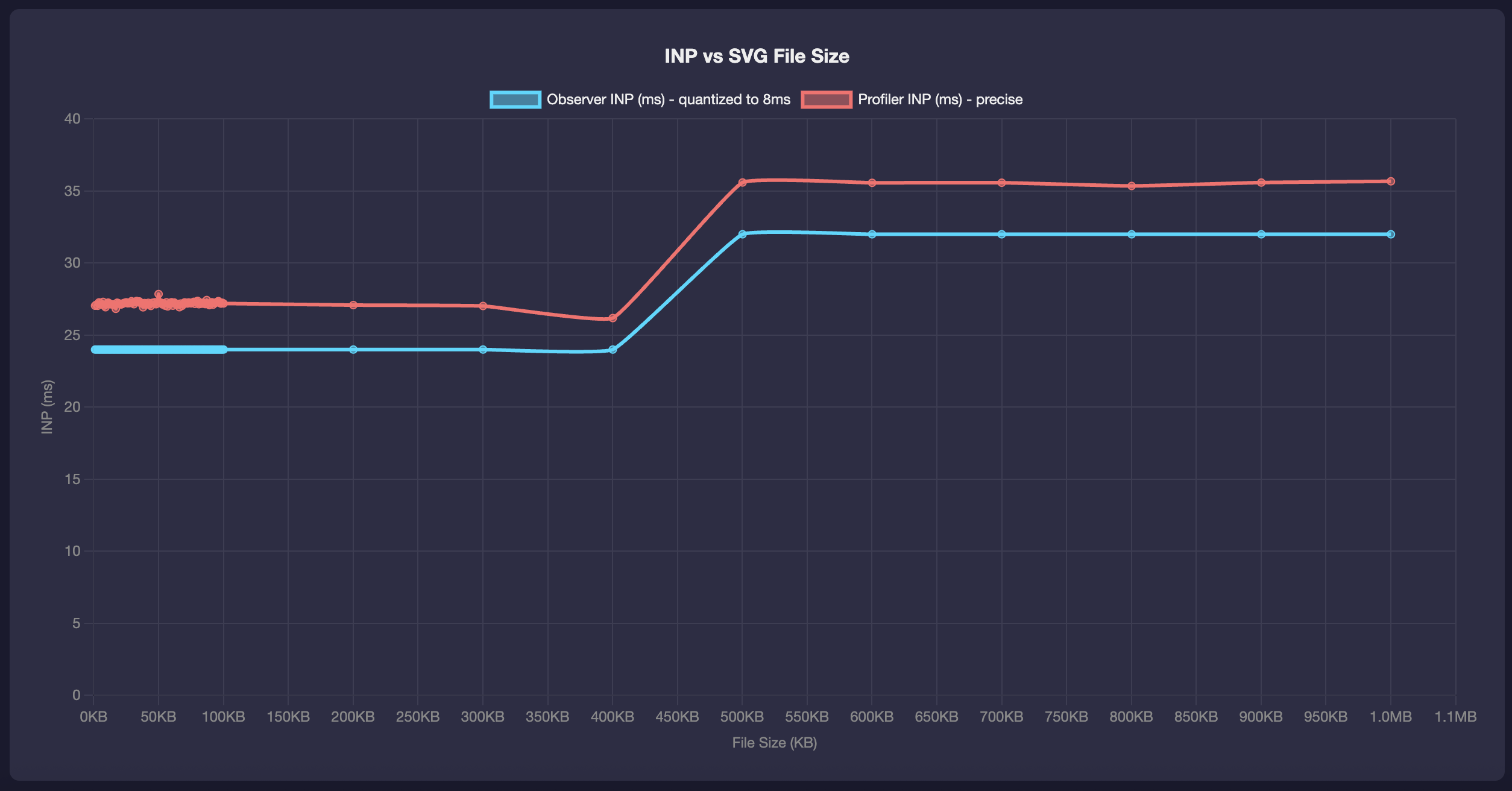
SVG results (files <= 1MB)
PNG results
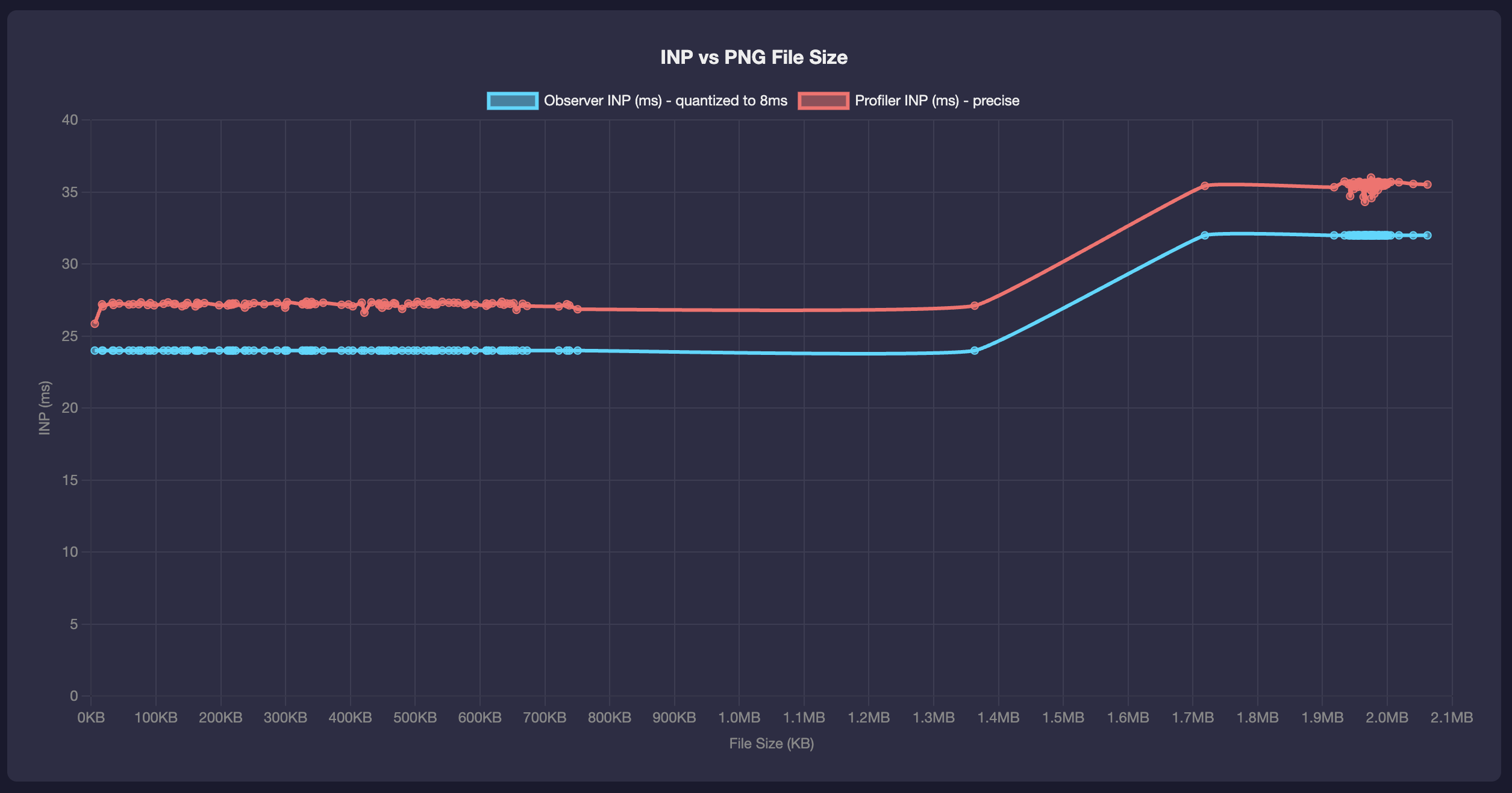
Overall, the performance observer INP and the profiler INP are pretty close so that's nice.
The rendering of SVGs has a curious stepped progression. Basically, any file smaller than 400K takes about the same time to render. Then we see a jump in rendering times and then the next jump is at around 1.2MB. And so on on.
With PNGs, also there seems to be a step although it's hard to tell from that data because we don't have many files between one and two MBs.
In terms of comparison, regardless of the file format, images under 400K will render in about the same time. When you go to larger files, especially much larger, PNGs seem to render faster.
BTW, here is an example of what the generated images look like, this is the 60K one:
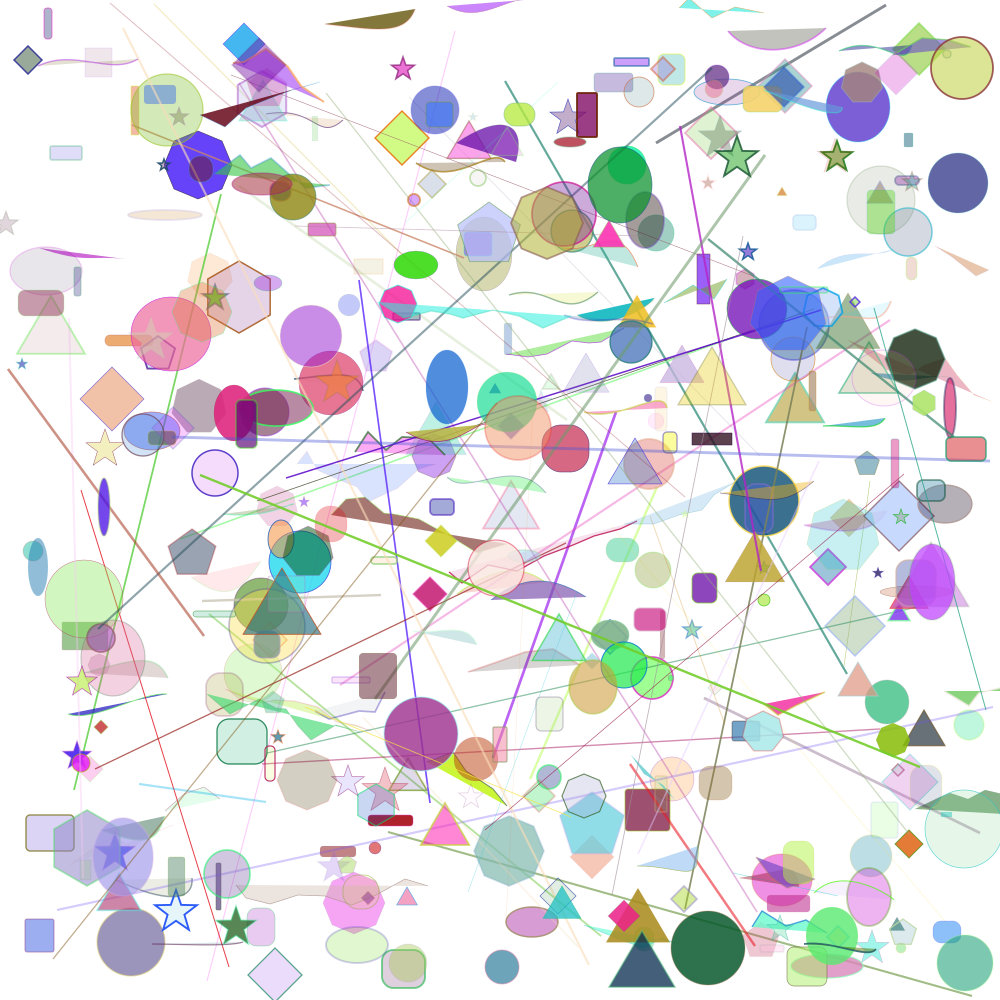
The bigger ones just have more shapes one on top of another to make the filesizes greater.
Comments? Find me on BlueSky, Mastodon, LinkedIn, Threads, Twitter




