x-webkit-speech input and textareas
New hotness, speech input. (The demo, the demo)
You get an input:
<input>
You add an x-webkit-speech attribute
<input x-webkit-speech>
And voila!
Or if you don't have a recent Chrome version, here's what these who have a recent Chrome version see:
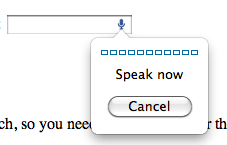
Nice.
Textareas
Speech inputs - gotta love them. But in textareas - you can't have them. So you can put an input and a textarea and copy over the content.
html:
<textarea id="txt"></textarea> <input x-webkit-speech id="mike"/>
With some CSS you can remove the border, add pointy cursor, etc make it look like not an input.
#mike { font-size: 25px; width: 25px; height: 25px; cursor:pointer; border: none; position: absolute; margin-left: 5px; outline: none; background: transparent; } #txt { height: 150px; width: 150px; }
Finally a little JavaScript to a/ unfocus the input and b/ carry over the content from the input to the textarea
var mike = document.getElementById('mike'); mike.onfocus = mike.blur; mike.onwebkitspeechchange = function(e) { //console.log(e); // SpeechInputEvent document.getElementById('txt').value = mike.value; };
That's all there is. Click over to the demo.
Here's what you should see in Chrome:
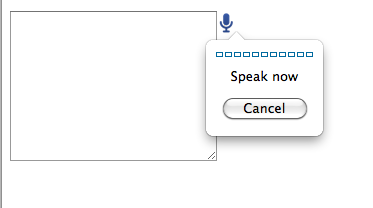
You can see that console.log() there - it's definitelly worth exploring. The thing is a SpeechInputEvent type of object is passed to the handler of the onwebkitspeechchange event. This object has some interesting properties, such as the array results[] which is number of guesses what you've said and confidence (0 to 1 it seems) in the guess.
Enjoy and go ahead and add these all over the place!
This entry was posted on Saturday, August 6th, 2011 and is filed under (x)HTML(5). You can follow any responses to this entry through the RSS 2.0 feed. You can leave a response, or trackback from your own site.
Get notification for future posts: follow me on Twitter or subscribe to my RSS feed

August 6th, 2011 at 4:25 am
Just a note. This functionality sends everything the user says to Google servers to provide this functionality.
August 6th, 2011 at 5:32 am
oh, rly? thanks, Anthony. I see how this can be a privacy concern
August 7th, 2011 at 5:20 am
Saw that demo’d by Paul Irish on Fronteers last year. Hadn’t seen the JS counterpart yet, thanks!
Sidenote: Still find it strange that they didn’t go for an syntax. Seems more logical – and in line with the others such as tel, number, email, etc. – to me.
August 7th, 2011 at 5:21 am
(oops, some HTML stuff got eaten in my previous comment):
.. didn’t go for an
input type="speech"syntax. Seems …August 8th, 2011 at 12:10 am
Bramus, yeah, input type is what I was kinda expecting too
August 8th, 2011 at 5:15 am
This way seems more flexible than input type=”speech” because it puts speech as an input method up there with the keyboard, mouse and touch-screen. i.e. you can speak your input into a text, password, url, email or any other input field.
I can see a case for input type=speech: recording voice input to a file. But in that case input type=file and the device api would probably be better.
August 8th, 2011 at 10:27 am
If it was an input type, then you would lose the actual type. What if you wanted to have a url input be speech enabled, and an email input? If both types were speech, you would lose the HTML5 validations.
August 8th, 2011 at 5:05 pm
Other than Chrome does any other browser support it?
August 9th, 2011 at 11:54 am
[...] thanks to phpied.com for the [...]
August 24th, 2011 at 6:22 pm
Hey Stoyan, I’m enjoying your articles. I don’t know if it’s possible, but if you’d allow me (and others) to subscribe via e-mail I’d greatly appreciate it.
I know there are feeds for readers, but I never use those.
August 28th, 2011 at 6:51 pm
I have written a tutorial and published it on my blog Redacacia, on how to control a microcontroller (Picaxe), using speech recogintion and HTML5 features of Google’s Chrome 11 browser.
You can read it all at:
http://redacacia.wordpress.com/2011/08/28/voice-operated-internet-control-of-a-picaxe/
Tayeb
October 18th, 2011 at 9:51 pm
Has anyone else figured out how to use this to record the mic input to a file?
Could you point me in a direction of how I might go about achieving this?
November 12th, 2011 at 5:29 am
[...] usual, this session presented by Paul Kinlan showed us the future of HTML5. I love the x-webkit-speech Chrome feature to make voice inputs that we already could see on the Madrid DevFest 2010. Paul made [...]
March 16th, 2012 at 4:08 am
Hi,
Cool stuff, but how can I get the results[] into a php variable/array since at that point we are inside javascript?
N
April 25th, 2012 at 12:13 pm
inspiration…
[...]x-webkit-speech input and textareas / Stoyan’s phpied.com[...]…
June 27th, 2012 at 6:26 pm
Thanks for that. Didn’t realise how effective it is to use on a textarea, I wrote a similar article the other day @ http://wp.me/p1V1Ia-cs thanks!
July 12th, 2012 at 10:15 am
@Andrew:
Does it actually make a remote request? It doesn’t show anything in the Charles HTTP Proxy or the WebKit Inspector Network tab.
August 8th, 2012 at 6:58 am
awsmmmm
January 25th, 2013 at 8:49 am
This is a pretty cool feature! I put up a demo that uses x-webkit-speech to do a twitter search and display the results. Check it out if you want: http://ahrengot.com/tutorials/speak-to-your-inputs/
April 22nd, 2013 at 10:26 am
Hi ! I’ve made a jQuery plugin called SpeechHelper to help manipulate speech recognition results given by the webkit speech text input.
Though it was a good idea to share it with the coummunity.
It’s actually text recognition from the webkit-speech input but the plugin can be attached directly to webkit speech change event. Sorry about the docs, they are in french but the code is pretty straight forward (and open source). Everyone can get it here:
jQuery SpeechHelper
Hope it helps some guys out there !




