or "How to help your users share your content on Facebook and not hurt performance"
Facebook's like button is much much faster now than it used to be. It also uses much fewer resources. And lazy-evaluates JavaScript on demand. And so on. But it's still not the only option when it comes to putting a "share this article on Facebook" widgety thing on your site.
The list of options is roughly listed in order of faster (and least features) to slowest (and most features).
#1: A share link
Note that this feature has been deprecated but it still does work. And you see it all over the place.
A simple link to sharer.php endpoint is all it takes. The u parameter is your URL. E.g.:
<a
  href="https://www.facebook.com/sharer/sharer.php?u=phpied.com"
  target="_blank">
  Share on Facebook
</a>
Try it:
The above is a hardcoded URL. You can, of course, spit the current URL on the server side. A JS-only client-side solution could be to take the document.location. You can also pop a window. And use a button, or an image. Say something like:
<button id="sharer">Share</button>
<script>
document.getElementById('sharer').onclick = function () {
  var url = 'https://www.facebook.com/sharer/sharer.php?u=';
  url += encodeURIComponent(location.href);
  window.open(url, 'fbshare', 'width=640,height=320');
};
</script>
Try it:
Method #1's performance price: none
This is just a link you host in your HTML or bit of JavaScript you can inline or package with your own JavaScript (it is, after all, your own JavaScript)
#2: Feed dialog
The feed dialog a next incarnation of the share popup.
It can also be as simple as a link, like so
https://www.facebook.com/dialog/feed
  ?link=jspatterns.com
  &app_id=179150165472010
  &redirect_uri=http://phpied.com
Try it:
You need a redirect_uri which can be something like a thank you page. But instead of "thank you", you can simply go back to the article by making redirect_uri and link point to the same URL
Again, a client-only solution could be something like:
  var feed = 'https://www.facebook.com/dialog/feed?app_id=179150165472010';
  var url = encodeURIComponent(location.href);
  feed += '&link=' + url + '&redirect_uri=' + url;
  window.open(feed, 'fbshare', 'width=640,height=480');
The result is a dialog that looks like:
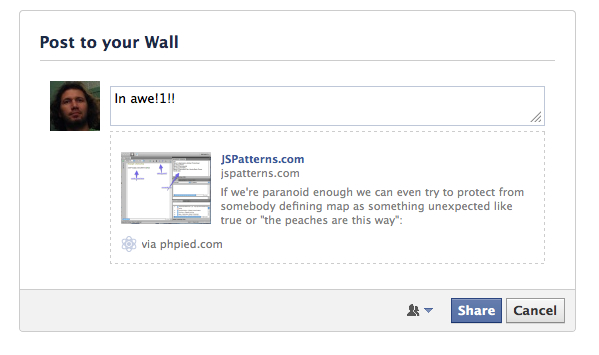
But this feed dialog can also be a popup. You do this by adding &display=popup. This hides the FB chrome. And you can also make the "thank you" page just a simple page that closes the window.
Try it:
The result:
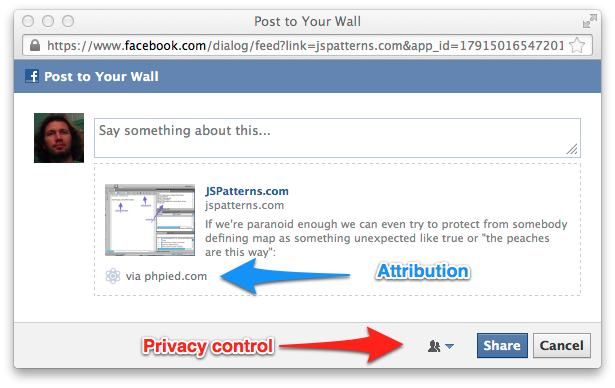
The other required thing is the app id. You need one. But that's actually cool because it has side benefits. For example better error messages for you (the app admin) that the users don't see. It also gives you a little "via phpied.com" attribution linked to the App URI which is a nice traffic boost hopefully as your sharer's friends see the story in their newsfeed or timeline and click the "via".
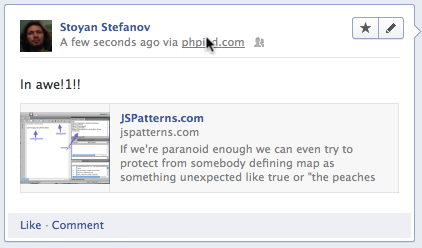
So, App ID is good, you can get one here.
Additionally there's a bunch of other params you can pass to the feed dialog to control how the story is displayed. You can provide title, description, image, etc. Full list here.
Method #2's performance price: none
Feed dialog has the same (non-existing) performance requirements as the share links. It's all inline. Any content coming from Facebook is only on user interaction.
BTW, this is the method youtube currently uses.
#3: Feed dialog via JS SDK
Now we move on from simple links and popups to using the JavaScript SDK.
First things first, you absolutely must load the SDK asynchronously. Or non-onload-blocking-asynchronously in an iframe. More on these two later.
After you load the SDK like so:
(function(d, s, id) {
  var js, fjs = d.getElementsByTagName(s)[0];
  if (d.getElementById(id)) return;
  js = d.createElement(s); js.id = id;
  js.src = "//connect.facebook.net/en_US/all.js";
  fjs.parentNode.insertBefore(js, fjs);
}(document, 'script', 'facebook-jssdk'));
Then, whenever you're ready, you can make a call to get the feed dialog:
FB.ui({
  method: 'feed',
  redirect_uri: 'http://phpied.com/files/fb/window.close.html',
  link: 'http://phpied.com',
  // picture: 'http...jpg',
  caption: 'Awesomesauce',
  // description: 'Must read daily!'
});
For a working example, check this example in jsbin
The result:
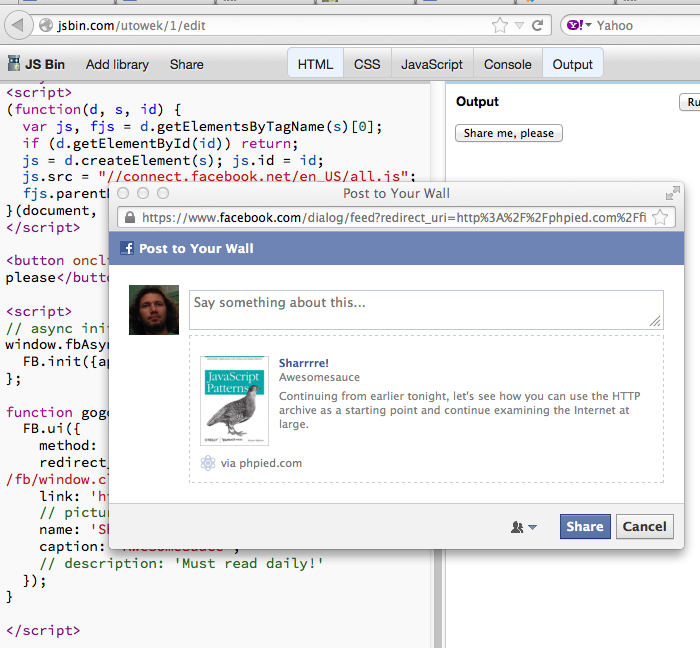
As you can see, this is now a real properly resized popup. No FB chrome, nice and clean. In general the JS SDK makes everything better. But you need to load it first - the performance price you pay for all the magic.
Method #3's performance price: an async JS
Opening the feed dialog this way requires you to load the Facebook JavaScript SDK. It's one JS file with a short expiration time (20 mins). When it loads, it also makes two additional requests required for cross-domain communication. These requests are small though and with long-expiration caching headers. Since the JS SDK is loaded many times during regular user's surfing throughout the web, these two additional requests have a very high probability of being cached. So is the JSSDK itself. If not cached, at least it's a conditional requests with likely a 304 Not Modified response.
Here's the waterfall of loading the jsbin test page where you can see the JS SDK loading (all.js) and the two x-domain thingies (xd_arbiter.php)
Note that by default the JS SDK sends an additional request checking whether the user is logged in. If you don't need that, make sure you set the login status init property to false, as shown in the test page, like:
FB.init({appId: 179150165472010, status: false});
When loading the JS SDK you must absolutely make sure it's loaded asynchronously, and even better - in an iframe, so the onload of your page is never blocked.
#4: Like button in an iframe
We're coming to the Like button. There are two ways to load it: either you create an iframe and point it to /plugins/like.php or you include the JS SDK and let the SDK create the iframe. Let's take a look at the you-create-iframe option first.
The integration is straightforward: You go to the help page, use the "wizard" configurator found there and end up with something like:
<iframe src="//www.facebook.com/plugins/like.php?href=phpied.com&width=450&show_faces=true&height=80" scrolling="no" frameborder="0" style="border:none; overflow:hidden; width:450px; height:80px;" allowTransparency="true"></iframe>
You're done!
The button comes in three layouts: standard (biggest), box_count and button_count
Try it:
Standard
Box count
Button count
As you can see, you get quite a bit more features here, e.g. number of likes and social context (who else has liked) in the standard layout. Also in the standard layout you get a little comment input. You don't get one in the other layouts because there's no space in the little iframe. You define the iframe and the code inside the iframe cannot break out of it and do something wild (or useful), e.g. open a big commenting dialog. Or make the iframe bigger because the word "Like" may be significantly longer in some languages. When you "trap" the iframe in your dimensions, it stays there.
Method #4's performance price: iframe content
In this method every time someone loads your page, they also visit a page (like.php) hosted by facebook.com. Now, this page is highly optimized: it only has html, sprite and async lazy-executed JS (which doesn't block onload). 3 requests in total. Maybe some faces (profile photos), depending on the layout and whether the user's friends have liked the URL.
As you probably know, every iframe's onload blocks the parent window's onload. So, if you feel so inclined you can always do any old lazy-load trick in the book. E.g. create the iframe after window.onload, or "double-frame" it, or (for the webkits out there) write the iframe src with a setTimeout of 0.
Another thing to consider is to always load the iframe via https, so there's no http-https redirect if the user has opted to always use facebook via https.
#5: Like button via SDK
This is building on what you already know about #3 and #4: You load the SDK. You sprinkle <fb:like> (or <div class="fb-like">) where you want buttons to appear. The SDK finds these and replaces them with iframes.
<!-- all defaults -->
<fb:like></fb:like>

<!-- layout, send button -->
<div class="fb-like" data-send="true"></div>
If you don't need to specify the URL to like, it's the current page.
Try it:
Standard
box count
button count
This is the most full-featured button implementation. It will resize the button as required by content and i18n. It will always present a comment dialog. (When people share with their own comment, these stories do better, because it's always nice to see a friend's comment attached to a URL, right?)
The good thing about this method is that you can load any other FB plugin (e.g. follow button by just adding an fb:follow in the HTML) without re-loading the SDK, it's already there and can handle all the plugins, dialogs and API requests.
Method #5's performance price: JSSDK + iframe content
Combining the features of methods #3 and #4 also combines their perfromance impact. Again, the like.php iframe is heavily optimized and tiny. Also the SDK has a chance of being cached from the users visit on another page. And, of course, you always load the SDK asynchronously so it's impact on your initial page loading is minimal. Or load the SDK in an iframe so the impact is virtually 0.
So the total cost in terms of number of requests in empty cache view is 6. 3 from the iframe + 3 from the SDK. Full cache view should be 1 request - just the like.php frame with the current count, faces and so on.
But again, to minimize the impact, you just load the SDK in an iframe (so the whole widget doesn't block onload and doesn't SPOF) or asynchronously (so it doesn't SPOF and doesn't block onload in IEs)
Summary
| # | Method | Features | Cost |
|---|---|---|---|
| 1 | Share link | link opens popup, no like count, no social context | none |
| 2 | Feed dialog | link opens page, no like count or context. You can pass customized description, image, etc for the story. Up to you to do a "thank you" page. | none |
| 3 | Feed via SDK | properly resized popup, JS control over the flow. No like count or context | Loading JS SDK |
| 4 | Like button in your frame | like count, social context, but no i18n resizing, comment option only sometimes | like.php iframe (3 requests) |
| 5 | Like button via SDK | All features plus proper resizing, comment dialog, easier to implement via fb:like tags in HTML | like.php + SDK |
I mentioned a few times in the article but let me repeat once again for the TL;DR folks. If you're loading the JS SDK, it's absolutely mandatory that you make sure it's either loaded asynchronously to avoid SPOF, or even better - in an iframe to avoid blocking onload.
Comments? Find me on BlueSky, Mastodon, LinkedIn, Threads, Twitter




