sleep() in JavaScript
PHP has a sleep() function, but JavaScript doesn't. Well, this is because it's useless, you might say, and you'll be right. But for simulating heavy processing and for misc performance measurements, it could be useful. So here's how you can go about creating a sleep() in JavaScript.
The code
function sleep(milliseconds) { var start = new Date().getTime(); for (var i = 0; i < 1e7; i++) { if ((new Date().getTime() - start) > milliseconds){ break; } } }
Usage
Sleep for 1 second (1000 milliseconds):
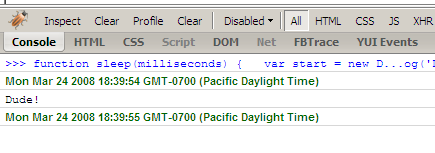
console.log(new Date()); console.log('Dude!'); sleep(1000); console.log(new Date());
Result in Firebug's console:
Post this entry to: » del.icio.us » Digg » Furl » Newsvine » reddit » Y!
March 25th, 2008 at 12:59 am
Eek! That will kill the browser and possibly the machine. Javascript is single threaded, so the browser will block while this executes, and the loop itself will just take up a lot of CPU. I've heard of some libraries that actually do sleep correctly in an asynchronous manner, but I can't remember the name right now.
March 25th, 2008 at 2:33 am
You mean sleep while not actually freezing, but just sitting idle? Interesting…
March 25th, 2008 at 3:41 am
@Stoyan: to me a while loop feels more natural:
function sleep(milliseconds) {var start = new Date().getTime();
while ((new Date().getTime() - start) < milliseconds){
// Do nothing
}
}
console.log(new Date());
sleep(5000);
console.log(new Date());
Tue Mar 25 2008 08:36:54 GMT+0000 (BST)
Tue Mar 25 2008 08:36:59 GMT+0000 (BST)
I'm thinking a non-blocking solution could look like this:
function sleep(milliseconds) {setTimeout(function(){
var start = new Date().getTime();
while ((new Date().getTime() - start) < milliseconds){
// Do nothing
}
},0);
}
console.log(new Date());
sleep(5000);
console.log(new Date());
The script returns after the sleep but the second logged date is the same as the first:
Tue Mar 25 2008 08:34:51 GMT+0000 (BST)Tue Mar 25 2008 08:34:51 GMT+0000 (BST)
March 25th, 2008 at 3:51 am
Thanks Stuart, both very good points.
March 25th, 2008 at 9:26 pm
I second what Philip said — This is a very bad idea. JavaScript is single threaded so while that for loop is running nothing else can execute (js timers, browser events, even the UI in most browsers). Try to sleep for 5 or more seconds and the browser will even warn the user that a script is running slowly.
Just use setTimeout.
If you really want a sleep function then try "Narative JavaScript" here: http://www.neilmix.com/narrativejs/doc/index.html. It's a pre-proccessor that allows you to use blocking code that it then changes to async code for you.
March 26th, 2008 at 2:52 am
Thanks for the link Jason.
The thing I had in mind is that sometimes that's exactly what scripts do, they are so busy that they freeze that browser for a part of a second or two. For performance experiments that's what I wanted to simulate: a very busy script that locks the browser.
I don't think setTimeout will simulate exactly that. As Stuart shows above, if you use setTimeout() with even 0 milliseconds delay, this tells the browser: "finish what're doing and when you have a chance, execute what I've set with a timeout". In Stuart's example the two dates are logged (part of the current thread) and the sleep happens right after that.
March 26th, 2008 at 8:01 am
Ok, fair enough. I would just put something that says "Don't actually do this unless you know what your doing". Someone who doesn't understand js internals might use your function when they really should use setTimeout.




