sleep() in JavaScript

PHP has a sleep() function, but JavaScript doesn't. Well, this is because it's useless, you might say, and you'll be right. But for simulating heavy processing and for misc performance measurements, it could be useful. So here's how you can go about creating a sleep() in JavaScript.

The code

function sleep(milliseconds) {
  var start = new Date().getTime();
  for (var i = 0; i < 1e7; i++) {
    if ((new Date().getTime() - start) > milliseconds){
      break;
    }
  }
}

Usage

Sleep for 1 second (1000 milliseconds):

console.log(new Date());
console.log('Dude!');
sleep(1000);
console.log(new Date());

Result in Firebug's console:
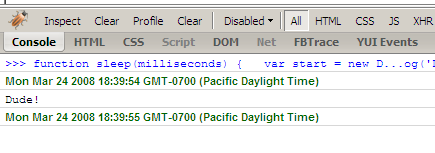
sleep.png

Bookmark and Share

Somewhat related posts

14 Responses to “sleep() in JavaScript”

  1. Philip Tellis Says:

    Eek! That will kill the browser and possibly the machine. Javascript is single threaded, so the browser will block while this executes, and the loop itself will just take up a lot of CPU. I’ve heard of some libraries that actually do sleep correctly in an asynchronous manner, but I can’t remember the name right now.

  2. Stoyan Says:

    You mean sleep while not actually freezing, but just sitting idle? Interesting…

  3. Stuart Colville Says:

    @Stoyan: to me a while loop feels more natural:

    function sleep(milliseconds) {
    var start = new Date().getTime();
    while ((new Date().getTime() - start) < milliseconds){
    // Do nothing
    }
    }

    console.log(new Date());
    sleep(5000);
    console.log(new Date());

    Tue Mar 25 2008 08:36:54 GMT+0000 (BST)
    Tue Mar 25 2008 08:36:59 GMT+0000 (BST)

    I’m thinking a non-blocking solution could look like this:

    function sleep(milliseconds) {
    setTimeout(function(){
    var start = new Date().getTime();
    while ((new Date().getTime() - start) < milliseconds){
    // Do nothing
    }
    },0);
    }

    console.log(new Date());
    sleep(5000);
    console.log(new Date());

    The script returns after the sleep but the second logged date is the same as the first:

    Tue Mar 25 2008 08:34:51 GMT+0000 (BST)
    Tue Mar 25 2008 08:34:51 GMT+0000 (BST)

  4. Stoyan Says:

    Thanks Stuart, both very good points.

  5. Jason Harwig Says:

    I second what Philip said — This is a very bad idea. JavaScript is single threaded so while that for loop is running nothing else can execute (js timers, browser events, even the UI in most browsers). Try to sleep for 5 or more seconds and the browser will even warn the user that a script is running slowly.

    Just use setTimeout.

    If you really want a sleep function then try “Narative JavaScript” here: http://www.neilmix.com/narrativejs/doc/index.html. It’s a pre-proccessor that allows you to use blocking code that it then changes to async code for you.

  6. Stoyan Says:

    Thanks for the link Jason.

    The thing I had in mind is that sometimes that’s exactly what scripts do, they are so busy that they freeze that browser for a part of a second or two. For performance experiments that’s what I wanted to simulate: a very busy script that locks the browser.

    I don’t think setTimeout will simulate exactly that. As Stuart shows above, if you use setTimeout() with even 0 milliseconds delay, this tells the browser: “finish what’re doing and when you have a chance, execute what I’ve set with a timeout”. In Stuart’s example the two dates are logged (part of the current thread) and the sleep happens right after that.

  7. Jason Harwig Says:

    Ok, fair enough. I would just put something that says “Don’t actually do this unless you know what your doing”. Someone who doesn’t understand js internals might use your function when they really should use setTimeout.

  8. Dave Grossman Says:

    This approach didn’t work for me because it blocked the whole CPU. I have a “Print this page” button that does an onclick to a javascript function that includes a window.print(). But prior to the window.print() I need to change document.form1.creditcard.value so that only the last 4 digits appear, e.g., xxxx-xxxx-xxxx-2080. Then after the window.print() I want to restore document.form1.creditcard.value. What I find is that evidently window.print() executes as a rather slow separate thread, so the credit card number is restored BEFORE the print function has a chance to capture the modified value. What I need is a blocking delay of about 4 seconds, but not a blocking delay that also blocks the print function. The only solution I’ve found is to pop up an alert box that tells the users to click after 4 seconds. Ugh!

  9. Tempura Says:

    Oh thanks so much for this code, you are a lifesaver! Keep up the good work with your blog.

  10. Tudor Says:

    Yes, unfortunately it boosts the CPU’s load at over 90% and is not asynchronous. Perhaps you should name the function “wait”.

  11. Marc Says:

    Everyone who is saying this function doesnt work like ti should is wrong.

    This is 100% what it should do. Notice he says he is making a sleep function that behaves like the PHP sleep() function, and it does.

    Thanks for it!

  12. Steve Says:

    @Marc: “Notice he says he is making a sleep function that behaves like the PHP sleep() function, and it does.” Does PHP’s sleep() function peg your CPU at 100% while it’s sleeping? That’s the issue here. This is appropriate for his testing use, but not for anything you’d want to inflict on a regular website user. +1 for marking this “do not use unless you really know what you’re doing.”

  13. KingRadical Says:

    Unfortunately, this is not a sleep. This is a wait. A “sleep” function should idle the processor for a specified time, not blast it into oblivion with work.

    Looking for a proper sleep() for JavaScript is becoming tiresome, and JS programmers are retarded and say things like “JUST USE SETTIMEOUT()” because that’s not always the *right* way to do something.

    For instance, I have a JavaScript app I’m writing right now that loops through about 1500 XML elements to prepare to add markers to a google map. During this process loop, CPUs are maxed out. I want to add an ACTUAL sleep for about 1-5 milliseconds (as in, a wait state where no processing is going on) to the loop to throttle back the CPU load to avoid killing peoples’ browsers. Unfortunately, it does not seem possible.

  14. Stoyan Says:

    In your case looks like setTimeout is the thing to do. JS is single-threaded, but you have two options. For latest/greatest browsers there are the web workers - https://wiki.mozilla.org/DOMWorkerThreads_current

    Otherwise, setTimeout with a 1ms timeout will allow you to unlock the thread and not block the UI. so the recipe is
    1. do a chunk of computation
    2. setTimeout to schedule the next part in 1ms
    … repeat till work is done

Leave a Reply




