Update: Second part
One way to do web performance research is to dig into what's out there. It's a tradition dating back from Steve Souders and his HPWS where he was looking at the top 10 Alexa sites for proof that best practices are or aren't followed. This involves loading each pages and inspecting the body or the response headers. Pros: real sites. Cons: manual labor, small sample.
I've done some image and CSS optimization research grabbing data in any way that looks easy: using the Yahoo image search API to get URLs or using Fiddler to monitor and export the traffic and loading a bazillion sites in IE with a script. Or using HTTPWatch. Pros: big sample. Cons: reinvent the wheel and use a different sampling criteria every time.
Today we have httparchive.org which makes performance research so much easier. It already has a bunch of data you can export and dive into immediately. It's also a common starting point so two people can examine the same data independently and compare or reproduce each other's results.
Let's see how to get started with the HTTP archive's data.

(Assuming MacOS, but the differences with other OS are negligible)
1. Install MySQL
2. Your mysql binary will be in /usr/local/mysql/bin/mysql. Feel free to create an alias. Your username is root and no password. This is of course terribly insecure but for a local machine with no important data, it's probably tolerable. Connect:
$ /usr/local/mysql/bin/mysql -u root
You'll see some text and a friendly cursor:
...
Type 'help;' or '\h' for help. Type '\c' to clear the current input statement.

mysql>
3. Create your new shiny database:
mysql> create database httparchive;
Query OK, 1 row affected (0.00 sec)
Look into the new DB, it's empty, no tables or data, as expected:
mysql> \u httparchive
Database changed
mysql> show tables;
Empty set (0.00 sec)
4. Quit mysql for now:
mysql> quit;
Bye
5. Go the archive and fetch the database schema.
$ curl http://httparchive.org/downloads/httparchive_schema.sql > ~/Downloads/schema.sql
While you're there get the latest DB dump. That would be the link that says IE. Today it says Dec 15 and is 2.5GB. So be prepared. Save it and unzip it as, say, ~/Downloads/dump.sql
6. Recreate the DB tables:
$ /usr/local/mysql/bin/mysql -u root httparchive < ~/Downloads/schema.sql
7. Import the data (takes a while):
$ /usr/local/mysql/bin/mysql -u root httparchive < ~/Downloads/dump.sql
8. Log back into mysql and look around:
$ /usr/local/mysql/bin/mysql -u root httparchive;

[yadda, yadda...]

mysql> show tables;
+-----------------------+
| Tables_in_httparchive |
+-----------------------+
| pages                 |
| pagesmobile           |
| requests              |
| requestsmobile        |
| stats                 |
+-----------------------+
5 rows in set (0.00 sec)
Dataaaa!
What's in the requests table I couldn't help but wonder (damn you, SATC)
mysql> describe requests;
+------------------------+------------------+------+-----+---------+----------------+
| Field                  | Type             | Null | Key | Default | Extra          |
+------------------------+------------------+------+-----+---------+----------------+
| requestid              | int(10) unsigned | NO   | PRI | NULL    | auto_increment |
| pageid                 | int(10) unsigned | NO   | MUL | NULL    |                |
| startedDateTime        | int(10) unsigned | YES  | MUL | NULL    |                |
| time                   | int(10) unsigned | YES  |     | NULL    |                |
| method                 | varchar(32)      | YES  |     | NULL    |                |
| url                    | text             | YES  |     | NULL    |                |
| urlShort               | varchar(255)     | YES  |     | NULL    |                |
| redirectUrl            | text             | YES  |     | NULL    |                |
| firstReq               | tinyint(1)       | NO   |     | NULL    |                |
| firstHtml              | tinyint(1)       | NO   |     | NULL    |                |
| reqHttpVersion         | varchar(32)      | YES  |     | NULL    |                |
| reqHeadersSize         | int(10) unsigned | YES  |     | NULL    |                |
| reqBodySize            | int(10) unsigned | YES  |     | NULL    |                |
| reqCookieLen           | int(10) unsigned | NO   |     | NULL    |                |
| reqOtherHeaders        | text             | YES  |     | NULL    |                |
| status                 | int(10) unsigned | YES  |     | NULL    |                |
| respHttpVersion        | varchar(32)      | YES  |     | NULL    |                |
| respHeadersSize        | int(10) unsigned | YES  |     | NULL    |                |
| respBodySize           | int(10) unsigned | YES  |     | NULL    |                |
| respSize               | int(10) unsigned | YES  |     | NULL    |                |
| respCookieLen          | int(10) unsigned | NO   |     | NULL    |                |
| mimeType               | varchar(255)     | YES  |     | NULL    |                |
.....
Hm, I wonder what are common mime types these days. Limiting to 10000 or more occurrences of the same mime type, because there's a lot of garbage out there. If you've never looked into real web data, you'd surprised how much misconfiguration is going on. It's a small miracle the web even works.
9. Most common mime types:
select count(requestid) as ct, mimeType
  from requests
  group by mimeType
  having ct > 10000
  order by ct desc;
+---------+-------------------------------+
| ct      | mimeType                      |
+---------+-------------------------------+
| 7448471 | image/jpeg                    |
| 4640536 | image/gif                     |
| 4293966 | image/png                     |
| 2843749 | text/html                     |
| 1837887 | application/x-javascript      |
| 1713899 | text/javascript               |
| 1455097 | text/css                      |
| 1093004 | application/javascript        |
|  619605 |                               |
|  343018 | application/x-shockwave-flash |
|  188799 | image/x-icon                  |
|  169928 | text/plain                    |
|   70226 | text/xml                      |
|   50439 | font/eot                      |
|   45416 | application/xml               |
|   41052 | application/octet-stream      |
|   38618 | application/json              |
|   30201 | text/x-cross-domain-policy    |
|   25248 | image/vnd.microsoft.icon      |
|   20513 | image/jpg                     |
|   12854 | application/vnd.ms-fontobject |
|   11788 | image/pjpeg                   |
+---------+-------------------------------+
22 rows in set (2 min 25.18 sec)
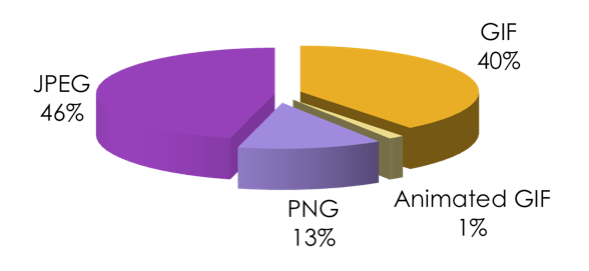
So the web is mostly made of JPEGs. GIFs are still more than PNGs despite all best efforts. Although OTOH (assuming these are comparable datasets), PNG is definitely gaining compared to this picture from two and a half years ago. Anyway.
It's you time!
So this is how easy it is to get started with the HTTPArchive. What experiment would you run with this data?
Comments? Find me on BlueSky, Mastodon, LinkedIn, Threads, Twitter