Delay loading your print CSS
So you have two stylesheets on your page, like this:
<link type="text/css" rel="stylesheet" href="screen.css" media="screen" /> <link type="text/css" rel="stylesheet" href="print.css" media="print" />
The first one is used to render the page on screen, the other one is used for printing the page and print previewing it. Good.
The thing is, when it comes to performance, the browser won't render any part of the page, until all stylesheets are downloaded (fiddled with here). That includes, unfortunately, stylesheets not designed for the currently rendered media. In other words, the browser won't display your page, until the print stylesheet is also downloaded, although it's not used at all for displaying the page. That sucks and should really be addressed in future browser versions.
Test
I did a test page to check this, it's here - print.php. It includes two stylesheets, the first one intentionally sleep()s for 5 seconds, the second one - for 10 seconds.
The result is that in both Firefox and IE it takes 15 seconds for this page to be rendered. Here's the Firebug picture:
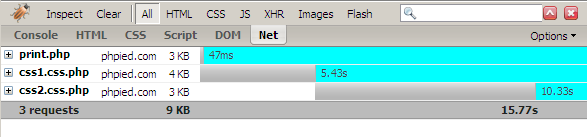
In Safari on Windows, it only took 10 seconds the first time around, as both stylesheets were downloaded simultaneously. Good. The bad is that after refresh, the first CSS was not even requested, I tried it a few times, actually sometimes I got the error "The error was: “unknown error” ((null):10053) ", but hey, this is the first release of the browser, it can't be perfect. Actually after I shut down Fiddler, which is what I used to monitor the HTTP traffic, the page was back to normal, so it's not clear who's to blame.
So?
Well, in order to increase rendering performance, all stylesheets not absolutely needed to initially render a page should be loaded after the page load, in the background. Once the user has a fast rendered page to interact with, you can load the additional CSS (and JavaScripts for that matter) in the background, using script and style DOM includes.
Update: From my comment bellow - a better option is to include the print css as part of the main css:
@media print {…}
Post this entry to: » del.icio.us » Digg » Furl » Newsvine » reddit » Y!
June 18th, 2007 at 2:45 pm
Interesting idea but wouldn't this prevent non-javascript devices from using the print style sheet?
June 18th, 2007 at 2:58 pm
@Scott: Perhaps you could include a noscript section…?
You could also have an SWF loaded into an object section that writes Javascript to the page that pulls the print stylesheet into the page flow…
:)
June 18th, 2007 at 3:03 pm
This sounds a little backwards to me. I'm not sure we should add this kind of complexity to save a few k in downloads. Requiring Flash or JavaScript in order for the print CSS to work adds requirements to the user environment for what is probably minimal gains in performance.
Can I ask how this idea was sparked? Did you have a real life scenario that made this worth investigating?
Interesting, but I'm not sure it's useful.
June 18th, 2007 at 3:33 pm
I agree with Nathan. Usually the print stylesheet only takes a few extra bytes.
June 18th, 2007 at 4:03 pm
Thanks for the constructive comments!
@Nathan - There was no real-life scenario, just a quest for understanding how to build high-performance pages.
@Michel - I guess the only thing you can do to make it more complicated is to have a javascript that makes an AJAX request to get contents for another script that generates the OBJECT tag on the fly
@Scott - You're right. The other option (and probably the best) is to include the print styles in the main CSS document with @media print {…}
The question was not to save a few Kb, because you end up downloading the file anyway, only delayed in the background. The question was to decrease the number of HTTP requests during the initial load, since those are the most expensive. The thing in this case is that you have network latency and you never know how long it could take to download 1k css file. During this time users don't see anything and the whole page seems slow to them. There were stats somewhere showing what percentage of the users will abandon the site for every second delay in loading. It's just unfortunate to lose visitors when you page is fully loaded, but not rendered because the browser is waiting for one more css file which is not immediately needed.
June 18th, 2007 at 8:24 pm
Interesting point. 1 kb may not be much on a per-page situation, but if you get a million visitors a month, that's 1 GB of wasted bandwidth right there. Still not a huge amount for a large website, but nonetheless something worth investigating. Relying on js doesn't seem great to me either, for the reasons already mentioned + the extra bandwidth + processing time required. Browsers should really be the ones offering a solution.
June 19th, 2007 at 2:46 am
It's a creative idea, but it really hurts the accessibility of your page.
If for some reason JS is unavailable, the browser won't be able to use the print stylesheet. As a result you can only print the page including the navigation, banners etc…stuff you really don't want to find back on your printed document.
June 19th, 2007 at 3:41 am
Thanks for the info, it's fun to figure these things out even if there isn't an "extreme" real-world need!
But it's an interesting read none-the-less…
June 19th, 2007 at 6:12 am
hmmm, interesting discovery.
Like everyone else has said, is this something really to fret about?
The print style sheet should definitely be no bigger than a few bytes. After the first page load the styles should be cached by default reducing the load on the server. So even with this problem you are only talking about shaving off a few milliseconds on the initial load.
I did a quick search on google about possibly importing the css through javascript but came across this informative article instead:
http://www.sitepoint.com/blogs/2007/04/10/faster-page-loads-bundle-your-css-and-javascript/
June 19th, 2007 at 2:23 pm
[…] Neste simples tutorial ensina como fazer. A técnica é simples. Ele simplesmente insere um script PHP no código CSS. Através da função sleep do PHP, browser pára a exibição do conteúdo, enquanto isso o css é carregado. Simples, não? […]
June 20th, 2007 at 4:15 am
[…] Delay loading your print CSS […]
June 20th, 2007 at 8:10 am
It doesn't happend in Opera (I'm using Opera 9.21)
June 26th, 2007 at 8:24 am
In Opera the content is usually displayed earlier (even instantly if you want to). About 2 seconds after refresh the table is displayed unstyled, after 6 seconds the styles are applied, after about 11 seconds the page has finished loading.
In the 'preferences' (ctrl-f12) under 'advanced->browsing->loading' you can set the time, when Opera should redraw the content. In my version it is set to 'redraw after 1 second'. If I set it to 5 seconds, the table content appears first after about 5 seconds (unstyled of course) and gets its styling not a second later (because of your delay).
June 27th, 2007 at 12:19 pm
I agree with Peter that browsers should not grab the print style sheet until the user tries to print or does a print preview, then it should grab it and cache it.
July 1st, 2007 at 10:04 am
@Peter
Yeah, it would be great if the browsers did not get the print css until someone prints. You might put the print style on your site, not because many people print, but because it saves a few people ink.
July 31st, 2007 at 12:29 pm
Actually, didn't everyone miss the obvious solution? Simply set up a hidden frame to load the print-only version of the CSS file. Maybe even an iframe at the very bottom would work, and style it to not display or even be visible. Since the main content will load simultaneously with the frame it should all work just fine. Haven't tried it cuz I don't need that, but I bet it will be good.
October 28th, 2007 at 6:07 pm
[…] You could think that the browser only loads the one stylesheet that matches the media it’s currently showing. Not true. All stylesheets, no matter what media they are tied to, are loaded at startup. […]
December 31st, 2007 at 1:20 am
[…] phpied.com » Blog Archive » Delay loading your print CSS (tags: css performance development) […]
February 9th, 2008 at 3:31 am
[…] You could think that the browser only loads the one stylesheet that matches the media it’s currently showing. Not true. All stylesheets, no matter what media they are tied to, are loaded at startup. […]




