Sometimes you want to send an HTTP request and you don't care about the response. This is often used for logging stuff on the server. Usually you request a 1x1 pixel GIF file and send a bunch of query parameters. E.g.
htp://example.org/blank.gif?user=stoyan&browser=msie&creditcard=123JUSTKIDDING567
Such 1x1 gifs are often called "web bugs" or "beacons" and sometimes used for sneaky purposes such as checking whether-you-opened-that-email-I-sent-you-that-you-didn't-reply-to-although-I-told-you-it-was-urgent-dammit-now-I'm-gonna-tell-the-boss-yes-this-time-I'm-telling-the-boss!
Now (after we relax a bit)... instead of having your server send a blank GIF, however small, can you just send.. nothing? Yep, you can. Your server can respond with a "204 No content" header. Cool, eh, especially when you want to squeeze every bit of network traffic?
So the example above can look like:
htp://example.org/nope.php?user=stoyan&browser=msie&creditcard=123JUSTKIDDING567
And nope.php could be like:
// .... log whatever you need to log, then reply: header("HTTP/1.0 204 No Content");
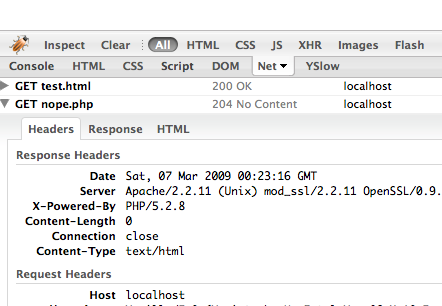
Here's what this looks like in Net Panel.
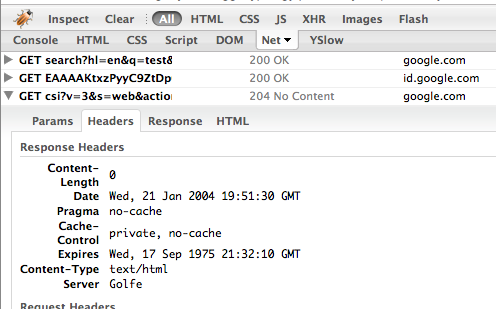
And an example in the wild (Google search beacon)
Another application of 204s I was thinking could be favicons. If you don't want to deal with favicons, but you don't want to respond with a 404 Not Found either, you can just configure Apache to send 204 to favicon requests. Could be useful when your application generates subdomains for your users, since the browser will request the favicon from each subdomian (unless you have a link-ed favicon).
Comments? Find me on BlueSky, Mastodon, LinkedIn, Threads, Twitter




